Users have asked HubSpot for this since 2018. We built it.
The safety net & upgrade kit for HubSpot Forms
FormRecall records every change to every form in your portal, lets you roll any form back in one click, recovers deleted forms — and upgrades your live forms with the advanced fields HubSpot never shipped.
How it works
No code on your site for Protect, no migration, nothing to maintain. Two minutes from install to full coverage.
Connect your portal
One click of “Sign in with HubSpot” — official OAuth, forms-only permission. FormRecall immediately takes a first snapshot of every form, and even finds forms that were already deleted before you arrived.
We watch every form, every minute
Around the clock, FormRecall compares every form against its last version. Any edit becomes a new version with a plain-English explanation of what changed — and an email alert if you want one.
Fix mistakes in one click
Someone broke a form on Friday evening? Open its history, see exactly which field changed, and restore the version from Thursday. The form keeps its ID — embeds and workflows don't even notice.
Part 1 · Protect
Every change recorded. Every mistake reversible.
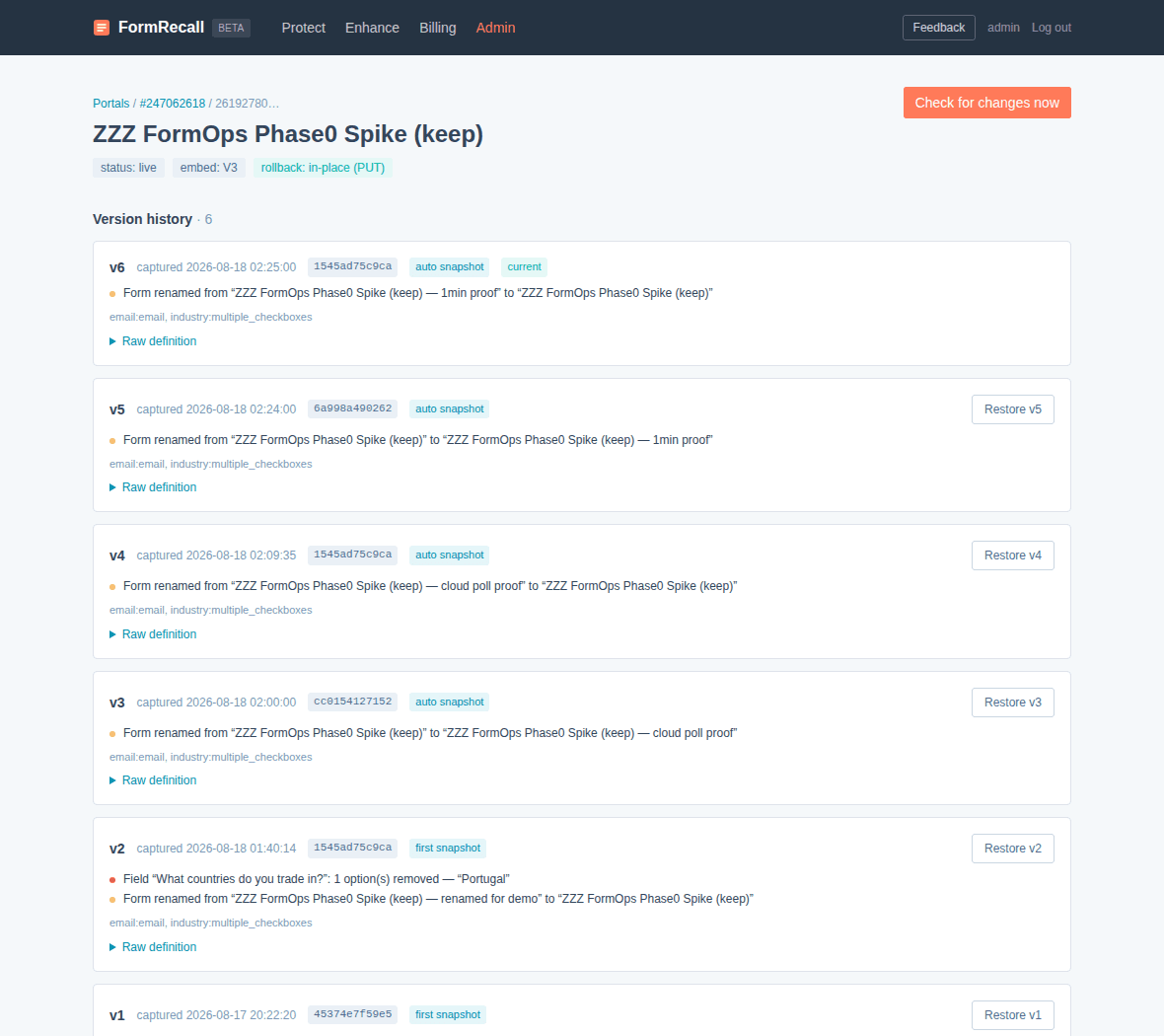
Version history with human diffs
Not just “something changed”. FormRecall tells you: “Field Email is now required”, “3 options removed from Countries”, “Consent text changed”, “reCAPTCHA disabled” — with severity, timestamps and the full stored definition of every version.
One-click restore — never destructive
Before any rollback the current state is snapshotted, and the result is verified against the stored copy. The form keeps its ID, so embed codes, CTAs and workflows stay untouched. You can even undo a restore.
Deleted Forms Vault — works retroactively
Every deleted form with its complete definition — including forms deleted before you installed FormRecall. Re-create any of them in one click, with a clear checklist of what to re-link.
Alerts & audit evidence
Email alerts the minute a form changes or disappears. For compliance: consent and legal-text changes are tracked per version, and Agency plans export the whole history as a PDF/CSV audit report — your GDPR evidence of what a form looked like on any given day.
Part 2 · Enhance
The fields HubSpot forms should have shipped with
Native HubSpot forms turn a 19-option question into a wall of checkboxes that buries your visitors — and your conversion rate. Enhance fixes that on top of your existing forms: add one script tag to your site and every submission, contact record and workflow stays 100% native HubSpot.
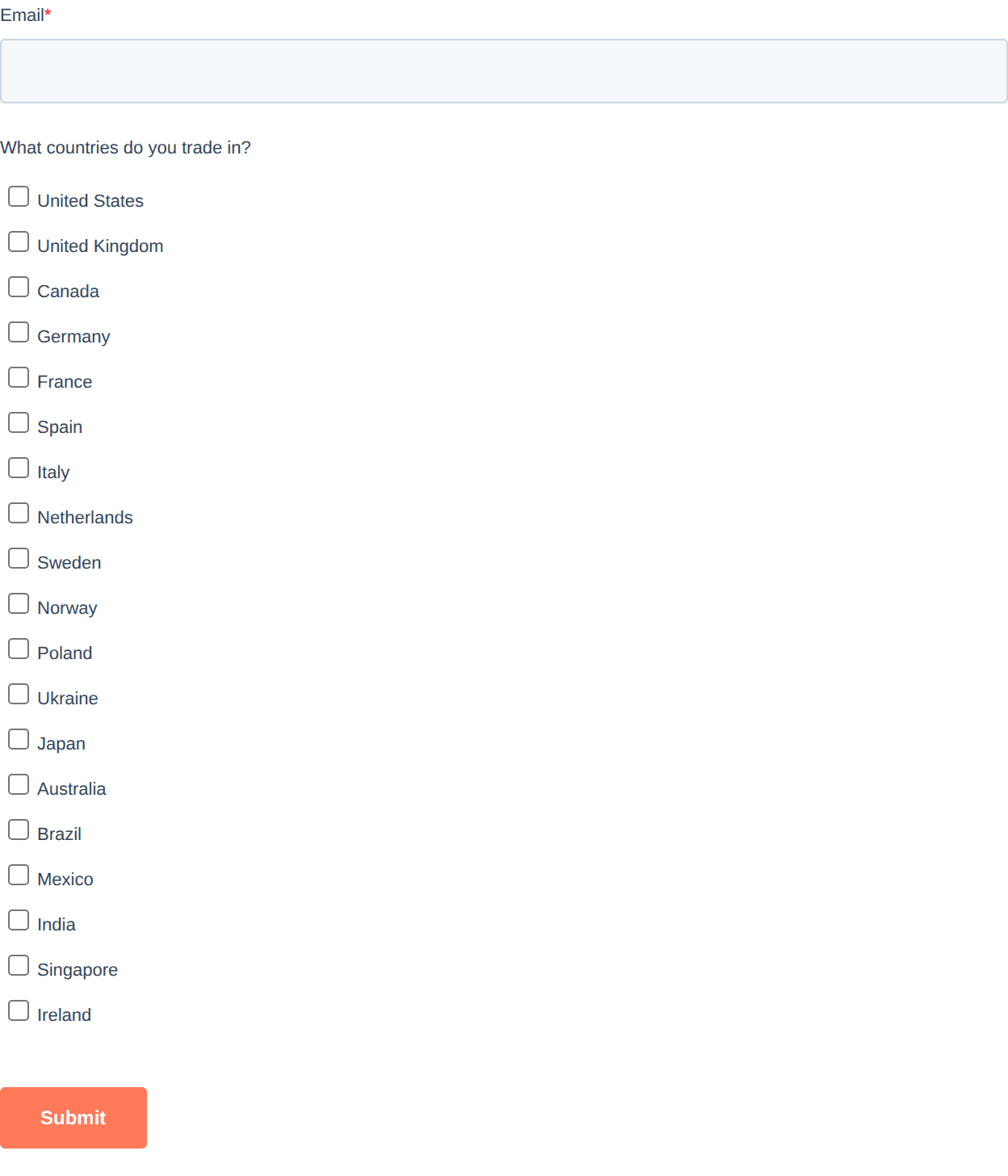
19 checkboxes, endless scrolling, no search. Visitors give up.
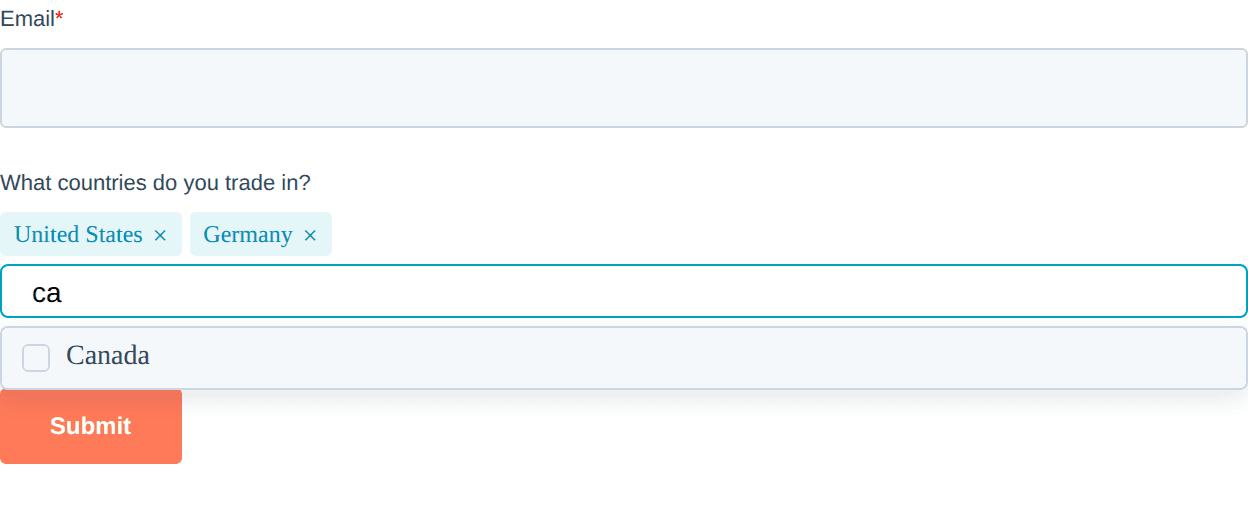
A compact multi-select: type to search, picks become tags, the whole field fits on one screen. Same form, same submission, same workflows.
🔍 Live search in big fields
Any checkbox group with 8+ options gets a search box, a selected-counter and “clear all”. Type “ger” — see Germany.
🏷 Compact multi-select
Really big fields (12+ options) collapse into a searchable dropdown with tags — the pattern every modern SaaS form uses, now on native HubSpot.
🌍 Country → State cascade
Pick “United States” — the state field shows only US states. Built-in dataset for 8 countries, no external services, no per-lookup fees.
The entire installation
<script src="https://formrecall.com/e/YOUR-PORTAL.js" defer></script>
One tag, site-wide. Thresholds and per-form settings are managed from your FormRecall dashboard — changes go live in minutes, no redeploys. If the script is unreachable, forms fall back to stock behaviour.
Pricing
Every install starts with a 7-day full-access trial — no card required. Beta users: first month free, then 50% off any plan for 3 months, plus lifetime priority support.
Free
- ✓Daily automatic checks
- ✓Change events feed (what & when)
- ✓7-day history window
- ✓Deleted forms list
- ✓7-day full trial of everything
Pro
most popular- ✓Checks every minute
- ✓Field-level diffs, plain English
- ✓One-click restore
- ✓1-year history
- ✓Email alerts
- ✓Enhance: advanced fields
Agency
- ✓Everything in Pro
- ✓10 client portals
- ✓Unlimited history
- ✓Team seats (editors & viewers)
- ✓Audit reports (PDF/CSV)
- ✓Cross-portal dashboard
| What you get | Free | Pro $39 | Agency $99 |
|---|---|---|---|
| Automatic checks | Once a day | Every minute | Every minute |
| History window | 7 days | 1 year | Unlimited |
| What-changed feed (events) | ✓ | ✓ | ✓ |
| Field-level diffs | — | ✓ | ✓ |
| One-click restore | — | ✓ | ✓ |
| Deleted Forms Vault | List only | Restore | Restore |
| Email alerts | — | ✓ | ✓ |
| Manual “check now” | — | ✓ | ✓ |
| Enhance: advanced fields | — | ✓ | ✓ |
| HubSpot portals | 1 | 1 | 10 |
| Team seats | — | — | Editors & viewers |
| Audit reports (PDF/CSV) | — | — | ✓ |
| Cross-portal dashboard | — | — | ✓ |
On every plan — including Free — FormRecall keeps recording everything. Upgrading unlocks the already-collected history retroactively.
Frequently asked questions
Can Enhance break my forms or lose submissions?+
No. Enhance never replaces your form — it draws better controls on top and writes every choice back into the original HubSpot inputs, so submissions, analytics, contact records and workflows behave exactly as before. If our script is ever unreachable, your form simply renders the way it always did. It also sends no visitor data anywhere.
Do you support forms built in the new (V4) editor?+
Monitoring, version history, field-level diffs, alerts and the Deleted Forms Vault work for all forms, including new-editor (V4) ones. Two things are limited by HubSpot itself: one-click in-place rollback needs write access that HubSpot hasn't opened for V4 yet (the moment they do, it turns on here), and a deleted V4 form is re-created as a classic-editor copy of its fields. Every form in your dashboard is clearly badged, so there are no surprises.
What data do you store?+
Only form definitions — the structure: fields, options, settings, consent text. We never read or store form submissions, contact records or any visitor data. OAuth access is limited to the forms scope, tokens are encrypted at rest, and you can disconnect at any time.
How does restore actually work?+
Before restoring, we snapshot the current state — so a restore is never destructive and can itself be undone. The selected version is then written back via HubSpot's API and verified against the stored copy. The form keeps its ID, so embed codes and workflows stay untouched. Deleted forms are re-created from the vault with a checklist of what to re-link.
What happens if I cancel?+
Your portal drops to the Free watchtower: we keep recording every change (so nothing is lost), you keep the events feed with a 7-day window, and if you upgrade again later the full history unlocks retroactively — including everything captured while you were on Free.
Is FormRecall affiliated with HubSpot?+
No — it's an independent product built on HubSpot's official public API and OAuth. It requests the minimum scope (forms) and follows the App Marketplace security requirements.
Private beta is open
We're onboarding a limited number of portals. Beta users get their first month free, then 50% off any plan for 3 months — and lifetime priority support.
No spam. One email when your access is ready.